
Once you've scored every interview question, complete the Final evaluation panel to turn your notes into a decision the rest of your team can act on. For initial and interim interviews you will decide to move them to the next round, or to reject them at that stage.
Complete the Final evaluation panel
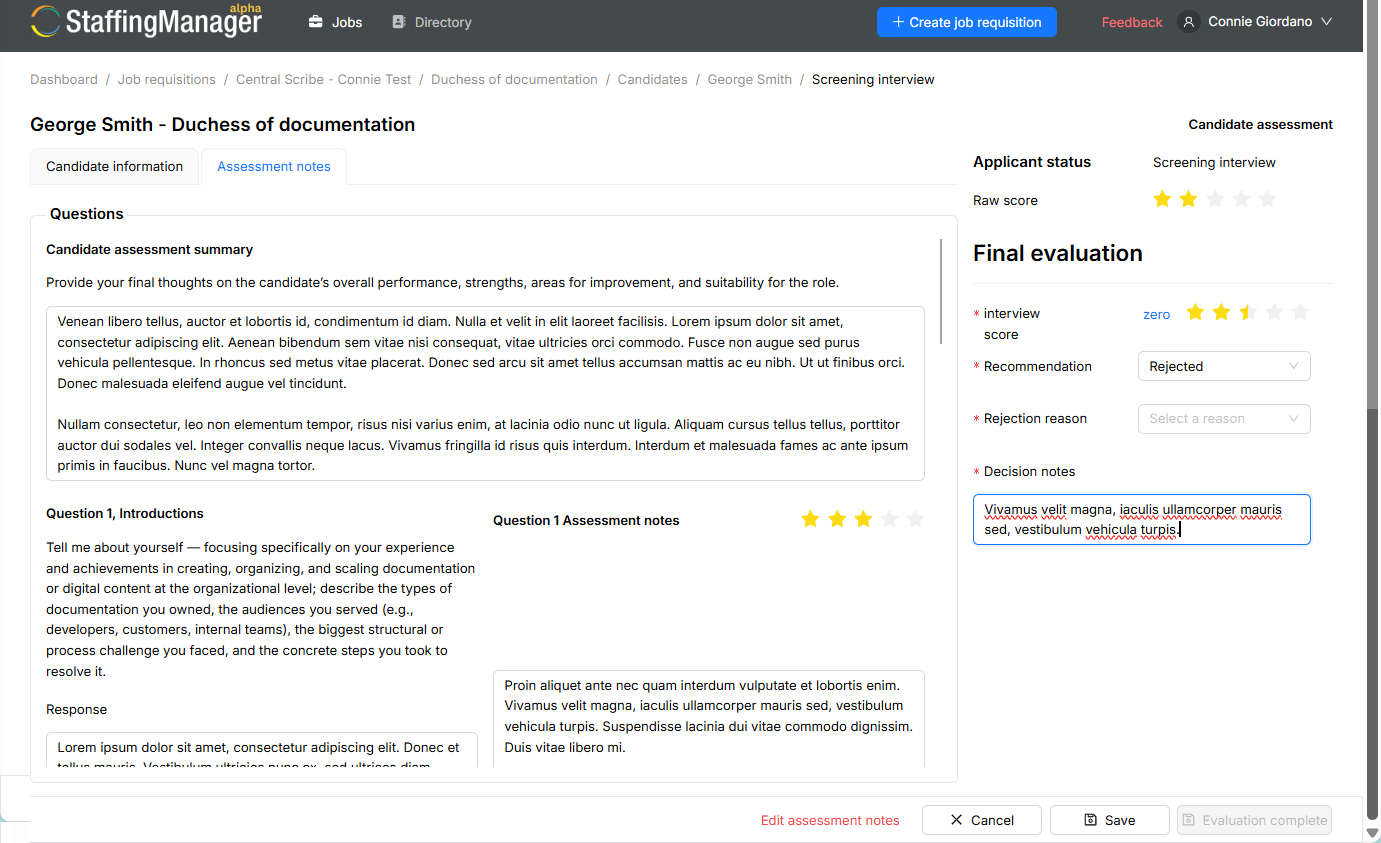
On the candidate's interview record, the Final evaluation panel appears on the right side of the Assessment notes tab.
-
Interview score: Select a star rating (one to five) that reflects your overall assessment of the interview.
-
Recommendation: Open the dropdown and select a decision: Move to next round or Rejected.
-
Decision notes: Enter your reasoning. This field is required if you plan to make an offer or reject the candidate, so it's worth completing even at this stage.
-
Follow-up notes/questions: Flag anything the next interviewer should dig into, for example, "focus next round on team leadership experience: strong technically, thinner on people management." If nothing remains, select the No follow-up questions checkbox.
View details of the interview/recommendation process
Write decision notes that hold up
-
Select your recommendation.
-
In the decision notes, write the specific, job-related reasons behind it: skills demonstrated (or not), experience relevant to the role, and how the candidate answered the situational and skills-based questions. Avoid notes about anything unrelated to job performance.
-
If you're moving the candidate forward, use the follow-up field to hand off context so the next interviewer isn't starting from zero.
StaffingManager won't let Decision notes stay blank for an offer or a rejection, on purpose. A clear, evidence-based reason for every decision keeps your process organized and protects your business if a hiring choice is ever questioned. It is also good practice to be able to explain why to a candidate who asks. Reasons tied to the job (skills, experience, demonstrated ability) hold up far better than reasons tied to a feeling.
Finish the evaluation
Select Evaluation complete to lock in your assessment. The button is unavailable until the required fields, including Recommendation and Decision notes, are filled in.
Once submitted, the candidate's application status changes to Candidate assessment completed, and their profile page shows updated scores:
-
Raw score: The candidate's question-level star ratings averaged together.
-
Interviewer evaluation: Your Final evaluation interview score.
-
Total score: A combined view of both, used to compare candidates.
What's next
When all interviews have been scored and assessed for candidates that have gone through multiple rounds, you will have a comprehensive set of notes on interviews and decisioning that provide a strong documentation trail if there are ever questions about a hiring process or decision.
Once you’ve made the decision on the best candidate, you’re ready to set up an offer package, including the offer letter, and communicate the offer to your candidate.