
Once your offer sheet is complete, Central Scribe StaffingManager can draft the offer letter for you, organized according to current best practices and in the same order as your offer sheet. You choose what the letter should cover, then review and approve the draft before it goes out.
Important
-
You must approve the Offer sheet first – the letter pulls its content from what you enter to draft the Offer letter.
-
Only enter figures and benefits you're authorized to offer. Treat this as the source of truth your offer letter, and your new hire's first paycheck, will be based on.
Start the offer letter
-
On the candidate's profile page, select Offer & materials.
-
Select the Offer letter tab.
Choose what to include
Letter topics
Select the checkboxes for the sections you want in the letter, or use Select all:
-
Role information
-
Summary of position's responsibilities
-
Benefits and location of position
-
Duration of offer
-
Disclaimers about the nature of the letter
-
Contact information to accept or discuss offer
-
Confirm and add content required by state or local place of employment
-
Include diversity, equity and inclusion language when appropriate
Candidate will have to sign agreements
Select any agreements the candidate must sign as part of accepting the offer:
-
Confidentiality
-
Invention assignment
-
Prior employer confidential information/restrictions
Contingencies of employment
Select any conditions the offer depends on:
-
Background check
-
Reference check
-
Satisfactory proof of candidate's right to work in the U.S.
-
Drug screening
Additional terms
Use the free-text field to add anything specific to this offer that isn't covered above.
Generate and review the draft
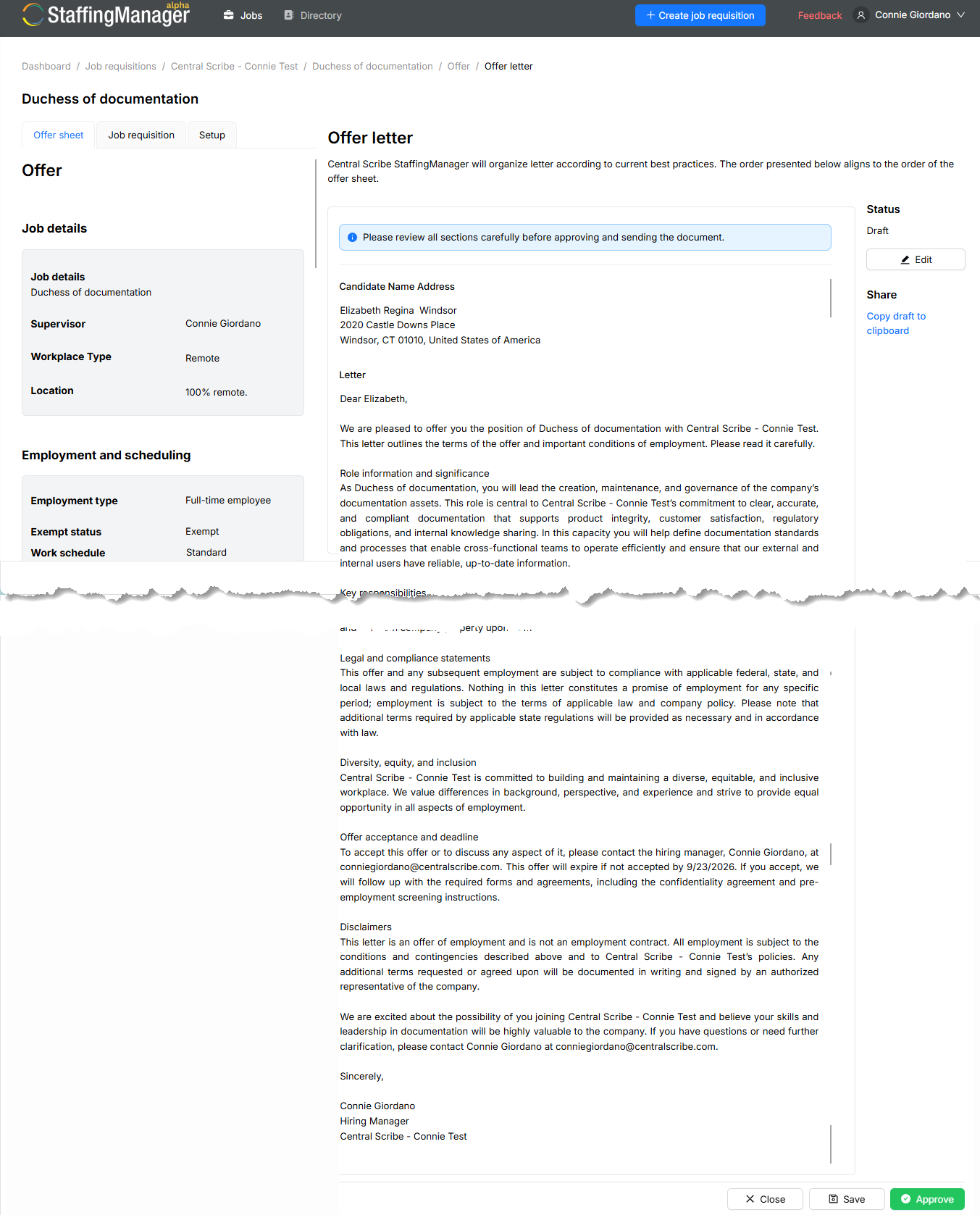
Select Create. Central Scribe StaffingManager generates a full draft letter based on your offer sheet and the topics you selected. The letter's status starts as Draft.
A banner reminds you: *"Please review all sections carefully before approving and sending the document."* Take this seriously — this is the offer your candidate will act on.
Use the AI engine to draft the offer letter
Edit, share or approve the draft
Select Edit (it toggles to Stop Editing) to make changes directly in the letter text. This is useful for adjusting tone, correcting details or adding a personal note before you approve it.
-
Copy draft to clipboard: Available once you're not actively editing, so you can paste the letter into email or another document.
-
Save: Stores your edits without changing the letter's status.
-
Approve: Finalizes the letter. Its status changes to Approved.
Once both the offer sheet and the offer letter are approved, the candidate's overall offer status updates to Offer ready on their profile and on the job requisition overview.