
Using the Dashboard
The StaffingManager Dashboard comprises three views: Jobs, Groups and Directories to allow you to view the status of all applicant tracking processes. on individual job requisitions, where you can view and manage all documents and processes related to each Job Opening in your queue.
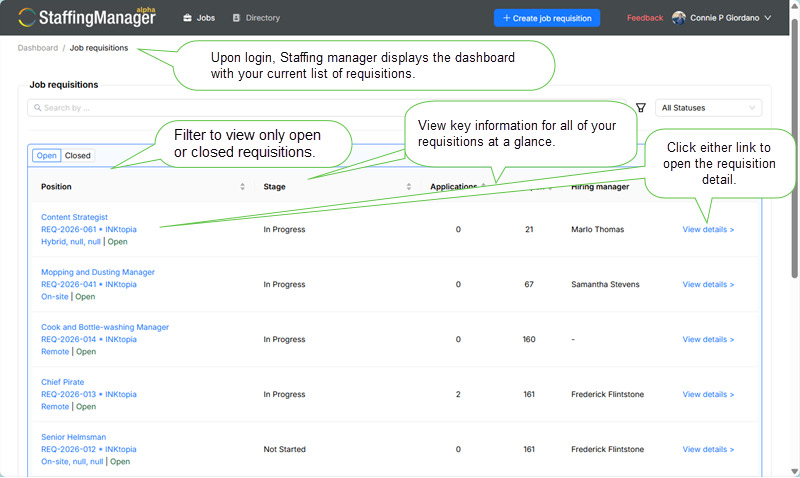
Note that the dashboard focuses on the role. You can click the hyperlink to any role listed and view and manage detailed information and all the materials associated with it.
Requisition management: the heart of StaffingManager
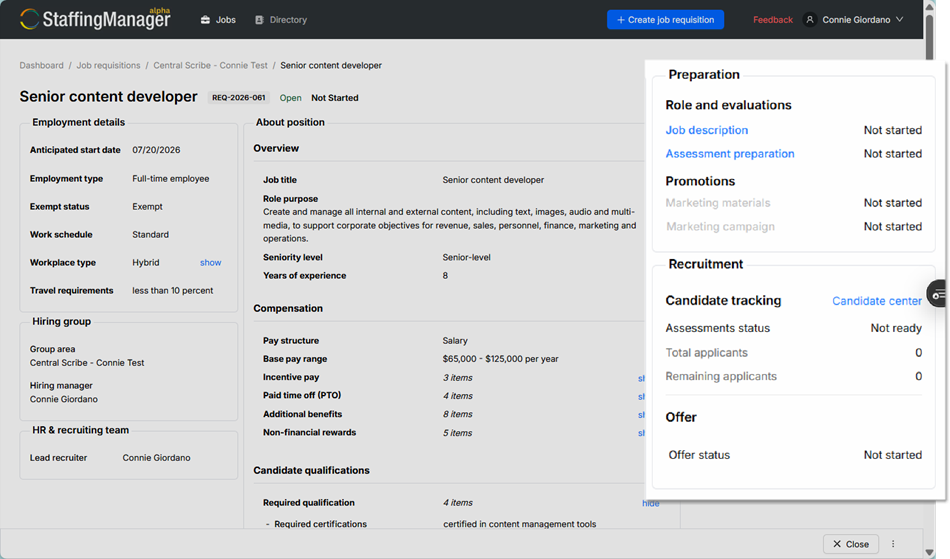
The requisition detail contains complete information entered for a given req. The righthand column focuses on the workflow and stage of a requisition once it’s been created:
-
Create a job description.
-
Prepare assessments for the role.
-
Manage how the role will be promoted to potential candidates.
-
Track the status of candidates including the results and scoring of interviews and decisioning candidates.
-
Track creation, approval, delivery and disposition of offers to selected candidates.
Note that links to the details of each stage of the requisition are enabled or disabled depending on the approval status of the preceding stage.
The right column of each stage’s detail view also displays the stages of the workflow for easy navigation.